Server Information
The "Overview" section is the landing page for your Bare Metal service and brings together all the key information about the server in one place — status, access credentials, hardware configuration, network details, and subscription information.
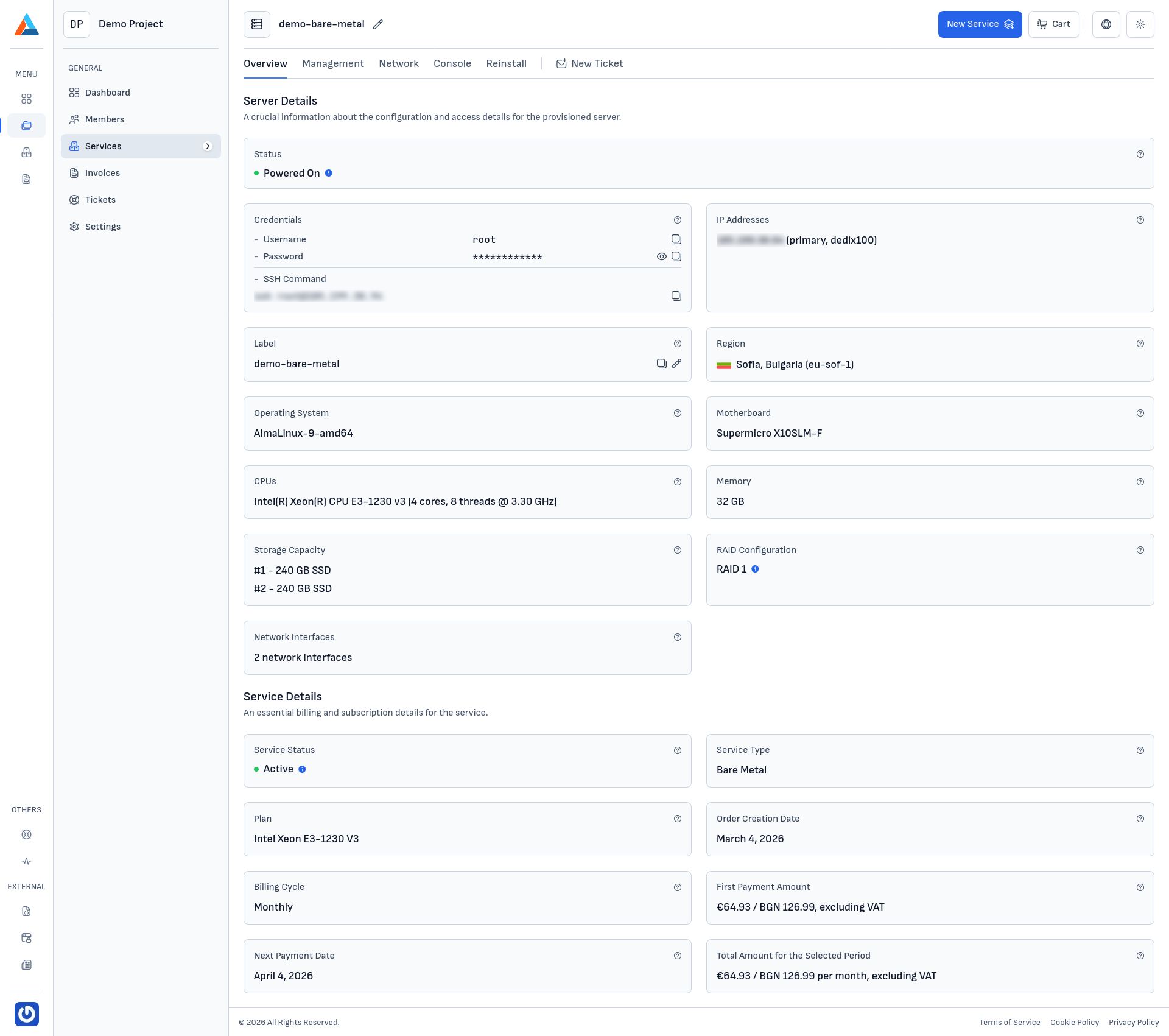
Server Details
At the top of the page, the "Server Details" section is displayed, containing the configuration and access details for the provisioned server.
Status
Shows the current power state of the server — Powered On or Powered Off. When a task is running (e.g., rebooting or enabling rescue mode), you'll see an additional indicator next to the status.
Credentials
- Username — the user used for SSH access (typically
rootfor Linux orAdministratorfor Windows) - Password — the current password, generated at installation or the last reinstallation
- SSH Command — a ready-to-use command you can copy and run in the terminal
Note
For security reasons, the password is hidden by default. Click the reveal icon to view it.
IP Addresses
A list of the public IP addresses assigned to the server. The primary IP address is marked.
Label
The service label, which you can change at any time via the edit icon. The label is visible in your list of services and helps you distinguish between multiple servers in the same project.
Region
The physical location of the data center from which the service is provided. The Bare Metal service is available in region eu-sof-1 — Sofia, Bulgaria 🇧🇬.
Hardware Configuration
Operating System
The currently installed operating system on the server. Can be changed via Reinstall.
Motherboard
The model of the server's motherboard. This information is useful when working with vendor-specific drivers or when you need to ensure compatible hardware specifications.
CPUs
Detailed information about the installed processor — manufacturer, model, number of physical cores, number of threads, and base frequency.
Memory
The total amount of RAM in gigabytes (GB).
Storage Capacity
A list of the physical disks installed in the server — size and type (SSD or NVMe). Each disk is marked with an identifier (B1, B2, etc.) corresponding to its position in the server.
RAID Configuration
The RAID scheme in which the disks are configured — for example RAID 1 (mirrored), RAID 10 (mirror + stripe), RAID 5, or RAID 6. The RAID is hardware-based and transparent to the operating system.
Tip
For detailed information about RAID levels and the differences between them, see the Glossary section.
Network Interfaces
The number of physical network interfaces on the server. Details for each interface (MAC address, network adapter) can be viewed in the Network section.
Service Details
At the bottom of the page, the "Service Details" section is displayed, which gathers the subscription and billing information:
- Service Status — the current state of the subscription (Active, Suspended, Cancelled)
- Service Type — the type of service (Bare Metal)
- Plan — the name of the selected configuration
- Order Creation Date — when the order was placed
- Billing Cycle — the payment cycle (Monthly, Annual)
- First Payment Amount — the amount paid at activation
- Next Payment Date — the date on which the next payment is expected
- Total Amount for the Selected Period — the amount that will be invoiced for subsequent periods