New Ticket
The New Ticket form is available from the "New Ticket" button on the ticket list, or directly at https://my.delta.bg/ticket/create.
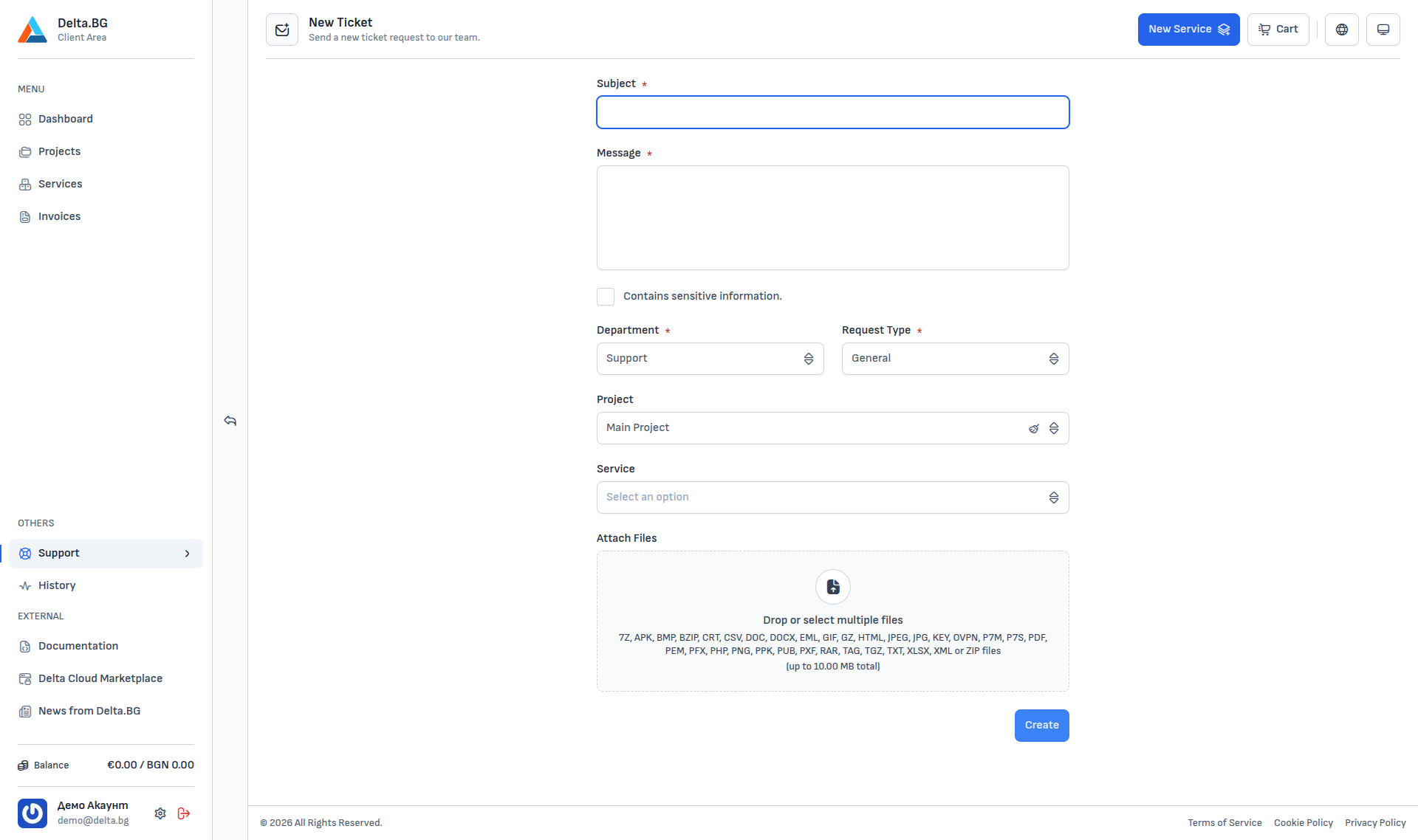
Form fields
| Field | Required | Description |
|---|---|---|
| Subject | ✔ | A short description of the question (appears in the list and as the subject of outgoing emails). |
| Message | ✔ | The detailed description of the request. |
| Contains sensitive information | — | Tick it when the text contains passwords, IBANs, or other sensitive data. |
| Department | ✔ | Defaults to "Support" or "Sales" for order requests. |
| Request Type | ✔ | Defaults to "General" or "Service Request", "Change Request", "Incident Request", and "Problem Request". |
| Project | — | Pre-filled with the current project if you open the form from Project → Tickets. You can clear it. |
| Service | — | The specific service in the selected project that the ticket is about. |
| Attach Files | — | Up to 10 MB total; all common formats are accepted (PNG, JPG, PDF, DOC, DOCX, XLSX, TXT, ZIP, etc.). |
Info
Linking a ticket to a specific service gives the team immediate context and avoids clarifying back-and-forth. If the service does not exist yet (for example, you are planning a future order), you can leave the field empty.
Submitting
Press "Create" to submit the ticket. You will be redirected to the ticket detail, where you can continue the conversation with the team and follow the status.